Get the bk22 APK — Slots, Fishing & Live Casino on Android
One free download puts the full bk22 game lobby in your pocket. Over 5,600 games, bKash deposits from ৳150, and 23-minute payouts — all running smoothly on Android 6.0 and up.
Scanned clean. No hidden charges. 18+
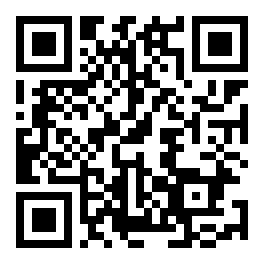
Scan with your Android camera to download bk22.apk directly to your phone.
Not on Android? Open bk22.today in your mobile browser and tap Add to Home Screen. The web app works on iOS and older Androids.
Is the bk22 APK Safe to Install?
The APK is built and distributed by bk22. Each release is scanned before publishing. Here is exactly what permissions the app requests and why.
SSL Encryption on Every Request
All traffic between the app and our servers uses TLS 1.3. Your account credentials and payment details are never sent in plain text. The same certificate protects the bk22 website and the APK — both endpoints are identical in terms of security.
Network Access Only
The app requests internet access to load games and process deposits. It does not ask for access to your contacts, call logs, SMS inbox, or location. If an app store listing or third-party APK site shows extra permissions, that is not an official bk22 build — download only from bk22.today.
No Camera or Microphone
Camera permission is only requested if you choose to upload a document for account review. Microphone access is never requested. You can confirm this after installation in Android Settings → Apps → bk22 → Permissions, and revoke camera access any time you are not uploading a document.
Update Policy
New APK versions are released on the same download page. The app shows a notification banner when a newer build is available. You do not need to uninstall the old version first — just open the new APK and Android upgrades it in place. Version history is kept for at least two releases so you can roll back if needed.
Everything in the bk22 App Lobby
Six game categories, one download. The app gives you the full lobby, not a stripped-down mobile version.
Slots
Titles from PG Soft, Red Tiger, FA Chai and more. Minimum bet starts at ৳1 on many games. Insect Master, Fortune Tree, Jungle Delight and Mine all load in under three seconds on a standard mobile data connection.

Fishing Games
Royal Fishing (Spribe, RTP 97.3%) and Mermaid Fishing run smoothly even on 4G. Touch controls are adapted for small screens — the aim and fire buttons are repositioned for one-thumb play. Bet from ৳1 per round.
Live Casino
Ezugi and Sexy Gaming live tables stream at up to 1080p inside the app. Teen Patti 20-20 and Roulette tables are open around the clock. Switch between portrait and landscape while the stream keeps running without dropping the connection.
Crash Games
Aviator by Sexy Gaming is one of the most played games on bk22. The app keeps the multiplier graph sharp and responsive on Android. Auto cash-out and in-game chat work the same as the desktop version. Bet from ৳5 per round.
bKash & Nagad Deposits
Open the Deposit screen, enter your bKash or Nagad number, and funds arrive in about 1 minute. The minimum is ৳150. Rocket, Upay and Bank Transfer are also available. Withdrawals of at least ৳400 typically process within 23 minutes.
Card Games & Lottery
Teen Patti 20-20, Super Keno and Keno Bonus Number are available inside the app without any extra plugin. Super Keno (Sexy Gaming) starts at ৳2, and Keno Bonus Number by Red Tiger offers an RTP of 97.7% — one of the highest on the platform.
How to Install the APK on Android
Android blocks APKs from outside the Play Store by default. These five steps turn that off for a single install and get you into the game lobby.
-
1
Allow Installation from Unknown Sources
Go to Settings → Security (some phones call it Apps → Special App Access → Install Unknown Apps). Find your browser — Chrome or any browser you use to download — and toggle Allow from this source to On. You only need to do this once. Turning it on for the browser only does not affect system-wide security.
-
2
Download bk22.apk
Tap the Download APK button above, or scan the QR code with your camera. The file is 32 MB and saves to your phone's Downloads folder. If your browser asks "This type of file can harm your device", tap Download anyway — this is a standard Android warning for all APK files, not specific to bk22.
-
3
Open the File and Tap Install
Open your notifications drawer and tap the completed download, or use a file manager to navigate to Downloads → bk22.apk. Android shows a permissions summary screen. Tap Install. The process takes about 10–15 seconds. Do not tap Open from the file manager — wait for the system installer to run.
-
4
Log In or Register
Tap Open once installation finishes. The app loads the bk22 login screen. If you already have an account, enter your phone number and password. New players tap Register — the sign-up form takes under two minutes and your first deposit bonus applies automatically.
-
5
Make Your First Deposit and Play
Go to Account → Deposit, choose bKash, Nagad, Rocket, Upay or Bank Transfer, and enter an amount of at least ৳150. Funds arrive in about 1 minute. The 110% welcome bonus — up to ৳13,000 — is credited to your account balance automatically alongside your first deposit.
iPhone / iPad Users
Apple does not allow APK files. Use the bk22 web app instead — it looks and behaves almost identically to the native Android app.
- 1Open Safari and go to bk22.today.
- 2Tap the Share icon at the bottom of the browser (the square with an arrow).
- 3Scroll down and tap Add to Home Screen, then tap Add.
- 4A bk22 icon appears on your home screen. Tap it to open the site in full-screen mode — no browser bars, no address bar.
- Games load faster inside the app than in a browser — no reload lag between sessions.
- Push notifications for deposit confirmations, bonus credits and withdrawal status.
- Fingerprint or PIN log-in — no typing your password every time.
- Auto-reconnects after a dropped mobile data connection mid-game.
Direct Download & bk22 APK File Details
Always download from bk22.today/bk22-apk/. Third-party APK mirror sites may distribute modified versions. If you are unsure, check the file size matches 32 MB before installing.
APK vs Web Browser — What Changes?
Both options give you access to the same bk22 account and game library. The APK adds a few conveniences. Here is a side-by-side view to help you decide.
| Feature | bk22 APK | Mobile Browser |
|---|---|---|
| Push Notifications | Yes — deposits, bonuses, withdrawals | Not available |
| Biometric Login | Fingerprint / PIN supported | Password only |
| Auto-Reconnect | Reconnects silently after data drop | Partial — page may need refresh |
| Game Load Speed | Faster — assets cached locally | Standard — reloads on each visit |
| Full Game Lobby | All categories | All categories |
| bKash / Nagad Deposit | Available | Available |
| Works on iPhone / iPad | Android only | Yes via Safari or Chrome |
| Storage Required | 32 MB on device | Near zero — runs in browser |
| Update Method | Download new APK from bk22.today | Automatic — always latest version |
| Live Casino Streaming | Up to 1080p | Up to 1080p |
| Cost | Free | Free |
Our recommendation: install the APK for the best experience on Android. If you are on iPhone or prefer not to sideload, the browser version at bk22.today works fully without any installation.
System Requirements — Will It Run on Your Phone?
The bk22 APK is built to run on a wide range of Android devices — including budget phones common in Bangladesh. These are the minimum and recommended specs.
Slots and fishing games run fine on minimum-spec devices. For live dealer tables with 1080p streaming, the recommended specs make a noticeable difference in smoothness.
Common Install Problems and How to Fix Them
Most installation errors have a straightforward fix. If your situation is not listed here, reach out via 24/7 Live Chat from the bk22 website.
| Problem | Most Likely Cause | How to Fix It |
|---|---|---|
| "Install blocked" or "Not allowed" | Android's unknown-sources restriction is still active for your browser or file manager. | Go to Settings → Apps → Special App Access → Install Unknown Apps. Find the app you used to open the APK and enable Allow from this source. Then try opening the APK file again. |
| "App not installed" after tapping Install | An older version of bk22 is already on the device and the new APK's signature does not match it — usually caused by downloading from a third-party mirror. | Go to Settings → Apps → bk22 and uninstall the existing app. Re-download bk22.apk directly from bk22.today/bk22-apk/ and install again. Your account data is stored server-side, so nothing is lost. |
| Download stops halfway or file is under 32 MB | Unstable mobile data connection or low storage space interrupted the download. | Connect to Wi-Fi or move to an area with stronger signal. Check that you have at least 50 MB free in Settings → Storage. Delete the incomplete file from Downloads, then tap the Download button again. |
| App opens but shows a blank white screen | The app cannot reach bk22 servers — typically a network or VPN issue. | Turn off any active VPN and switch between mobile data and Wi-Fi. If the problem persists, clear the app cache: Settings → Apps → bk22 → Storage → Clear Cache. Reopen the app. Do not tap Clear Data as that removes your saved login. |
| Games load slowly or freeze mid-round | Weak internet signal, or too many background apps consuming RAM. | Close other apps running in the background — especially video players and other browsers. Switch to a 4G or Wi-Fi connection. For live casino tables, a stable connection with at least 5 Mbps download speed is recommended. If freezes continue, restart the app rather than the phone. |
Questions Players Ask About the bk22 APK
Answers to the most common questions before and after downloading the app.
Jump to Question
Is the bk22 APK safe to install on my Android phone?
Yes. The APK is built and signed by bk22 and distributed only from bk22.today. It requests only internet access and optional camera access for document uploads. The file is scanned before each release. To stay safe, always download from the official page — third-party APK sites may distribute modified versions with added code. After installing, you can confirm the permissions in Settings → Apps → bk22 → Permissions.
My installation keeps failing — what should I try first?
The two most common causes are: (1) the "Install unknown apps" permission is not enabled for your browser or file manager, and (2) an older bk22 app from a different source is already installed. For the first issue, go to Settings → Apps → Special App Access → Install Unknown Apps and enable the relevant app. For the second, uninstall the existing bk22 app first, then re-download from bk22.today and install fresh. Your account is unaffected.
How do I update the bk22 app when a new version is released?
The app displays a banner notification when a newer version is available. Tap the banner, which takes you to the download page, or visit bk22.today/bk22-apk/ directly. Download the new APK and open it — Android will upgrade the installed app without deleting your login details or settings. You do not need to uninstall the old version first. Updates are released irregularly; checking the download page once a month is enough to stay current.
Does the bk22 APK work on iPhone or iPad?
No — APK files are Android-only. Apple's iOS does not support APK installation. iPhone and iPad users should open bk22.today in Safari, tap the Share icon, and choose Add to Home Screen. This creates a home screen shortcut that opens the site in full-screen mode, without browser navigation bars. All games, deposits and withdrawals work the same way on the iOS web app as on the Android native app.
Is it the same account I use on the bk22 website?
Yes — there is one account across all platforms. Log in with the same phone number and password you use on the website. Your balance, bonus credits, VIP tier and transaction history are all synced in real time. If you are already logged in on the website, just enter the same credentials in the app. There is no separate registration for the mobile app.
Does the 110% welcome bonus apply when I deposit through the app?
Yes. The 110% first-deposit bonus — up to ৳13,000 — applies regardless of whether you deposit through the app or the website. After registering your account, make your first deposit of at least ৳150 through the app's Deposit screen. The bonus is credited automatically alongside the deposit. The standard wagering requirement of 10× applies. The bonus is valid for 7 days from the date it is credited.
How do I uninstall the bk22 app, and will I lose my account?
Uninstalling the app does not affect your bk22 account. Your balance, history and bonuses are stored server-side, not on your device. To uninstall: long-press the bk22 icon on your home screen and tap Uninstall, or go to Settings → Apps → bk22 → Uninstall. You can reinstall any time by downloading the APK from this page and logging in with your existing credentials.
Ready to Play? Get the APK Now
Free download, 32 MB, works on Android 6.0 and up. Deposit via bKash from ৳150 and play over 5,600 games — slots, fishing, live casino and crash — all from your phone.
18+ Play Responsibly · bk22.today · 24/7 Live Chat Support